Miscellaneous
LaTeX Tricks
Capability for displaying functions in LaTeX's algorithmic environment
Problem: The algorithmic package does not offer a command to print code functions.
Solution: Use the following code anywhere in your LaTeX document to enable commands \FUNC and \ENDFUNC :
\makeatletter
\newcommand{\algorithmicfunc}{\textbf{function}}
\newcommand{\algorithmicendfunc}{\algorithmicend\ \algorithmicfunc}
\newenvironment{ALC@func}{\begin{ALC@g}}{\end{ALC@g}}
\newcommand{\FUNC}[2][default]{\ALC@it\textbf{function}\ #2%
\ALC@com{#1}\begin{ALC@func}}
\ifthenelse{\boolean{ALC@noend}}{
    \newcommand{\ENDFUNC}{\end{ALC@func}}
  }{
    \newcommand{\ENDFUNC}{\end{ALC@func}\ALC@it\algorithmicendfunc}
  }
\makeatother
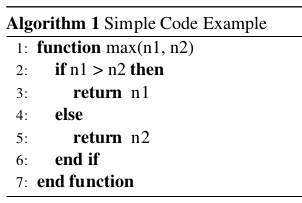
Simple usage example:
\begin{algorithm}
\caption{Simple Code Example}
\begin{algorithmic}[1]
	\FUNC{max(param1, param2)}
		\IF{param1 > param2}
		    \RETURN n1
		\ELSE
		    \RETURN n2
		\ENDIF
	\ENDFUNC
\end{algorithmic}
\end{algorithm}
Renders as: